 SupportBot
How SupportBot Works
A plain-language look at the technology behind every bot response. Runs a multi-model cascade: OpenAI GPT-5 as primary, Google Gemini as fallback.
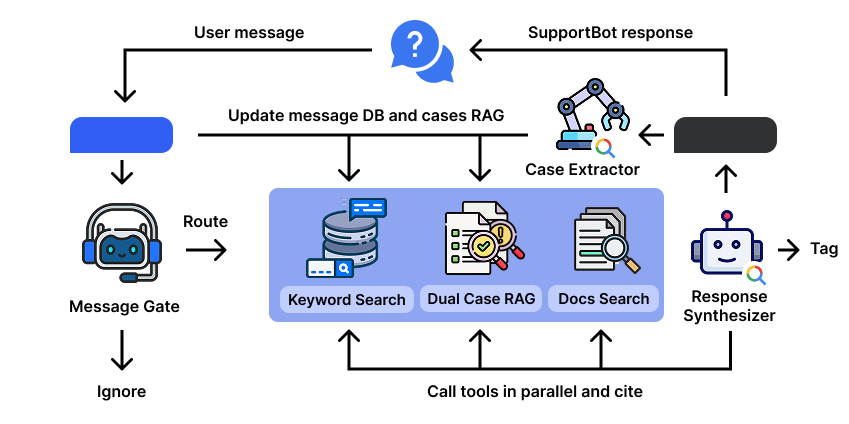
SupportBot message processing architecture
Getting started
An admin adds the bot to the group or channel. The bot starts working immediately — it reads new messages, builds a knowledge base, and answers questions.
Optionally, you can import the group’s full history via the Dashboard to build a case library.
Message Gate — when and what to answer
The bot reads messages in real time but doesn’t rush to answer. New messages accumulate in a queue. Once nobody in the group has typed for 1–2 minutes, the bot analyzes the entire queue and decides: which messages are questions that need an answer, and which are just chat, greetings, or memes.
The bot can detect multiple questions at once and answer them all. Typical time from question to response is 1–2 minutes.
If someone sends a new message while the bot is preparing its answer — the bot stops, discards the draft, and re-analyzes from scratch with the new message included. This ensures the response always reflects the full context, and the bot never interrupts a live conversation.
Search agents run in parallel
For each subtask, the bot launches a separate AI agent:
Keyword Search — classic text search across all group messages. Finds exact matches, error codes, model names.
Dual Case RAG — semantic search over the case library. RAG (Retrieval-Augmented Generation) means the bot finds the most relevant cases by meaning, not just keywords. "Dual" because there are two case types: verified solutions and recommendations.
Docs Search — search over your documentation (Google Docs links are specified in the group description). Documents are recursively processed and re-indexed every 10 minutes.
Response Synthesizer — crafting the answer
The final agent receives results from all sub-agents and synthesizes the answer. It picks the most relevant information and adds source links:
— Links to your documentation
— Links to solved cases (each case is a page showing a "problem → solution" summary plus a chunk of related chat history)
— Links to web sources when the latest data is needed
It also has access to Google Search for up-to-date information from the web.
If the bot doesn’t find enough information for a confident answer, it escalates to admins via @mention.
Case Extractor — the knowledge base grows itself
Alongside answering, the bot continuously analyzes new messages in the group. When someone solves a problem (even without the bot), the Case Extractor captures it as a structured case: problem, solution, context. It also uses Google Search to verify and refine solutions.
Each case is a link showing a summary and the related message history. Next time someone asks a similar question — the answer is already in the database, with a link to the case.
See an example case →
Multimodal — not just text
The bot processes photos (error screenshots, hardware photos), videos, and voice messages. Images are analyzed by an AI model, audio is transcribed. All of it becomes part of the case and is searchable.
What does this mean for you?
You get an AI agent that gets smarter every day — specifically for your community. No manual work, no writing FAQs, no model training. Just add the bot to your group and it starts learning from your history.
This is a novel approach to accurate technical support in group chats with minimized hallucinations — planned to be published as an academic paper.
Platforms
SupportBot works with Signal, WhatsApp, Telegram, Discord, and Slack.